


Two powerful digital navigational tools, heading and course-over- ground (COG) vectors, can help fine-tune your passage making.

Heading and course over the ground (COG) vectors are two of the most powerful tools offered by electronic navigation.
By combining the computing power of a chartplotter with data from satellites and onboard sensors, they provide navigators with much of the basic information needed for safe passage making.
A vector is something that has a numerical value and direction.
Heading and COG vectors use speed to calculate distance and course to project a future position.
While vector length is usually defined by time, some systems use fixed lengths.
The screen image figure 1, shows two vectors: a red heading vector, and a green COG vector.
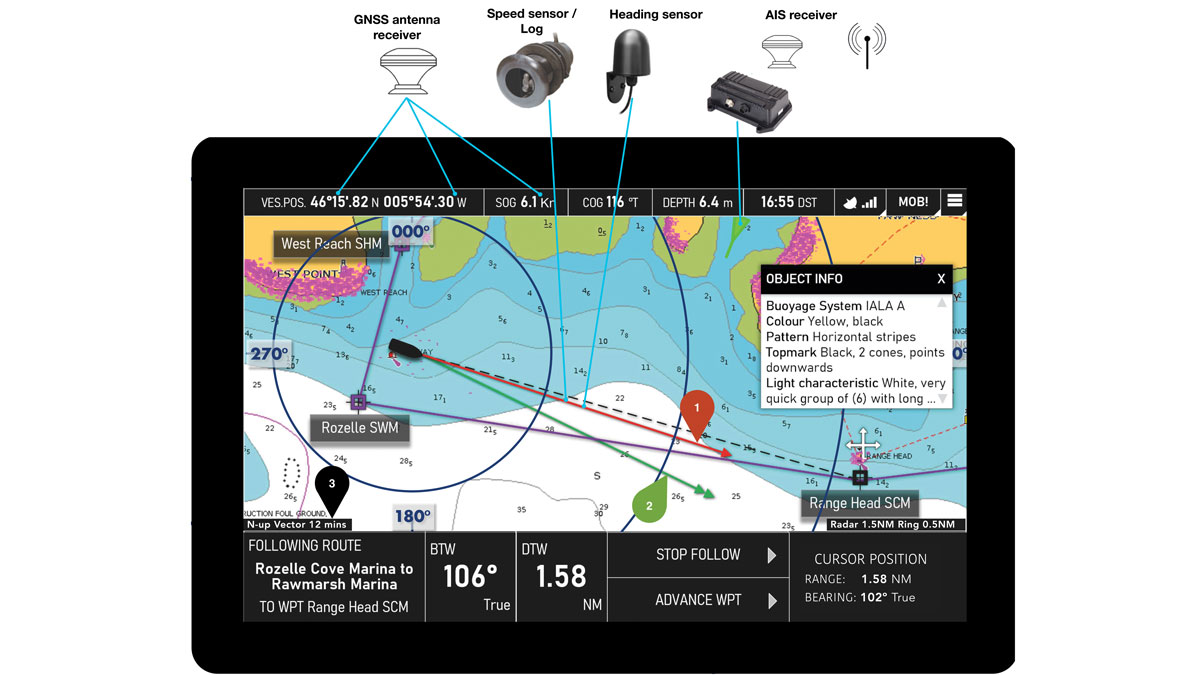
Heading vector: shows the bearing of the vessel’s heading and speed from heading and speed sensors. The vector moves with the vessel and alters length or direction in line with changes in heading and/or speed.
Course over ground (COG) vector: the direction and speed of a vessel over the ground, derived from GNSS. COG vectors change length and direction when the course and speed over the ground change.
Vector length: The length of the heading and COG vectors are set by the distance travelled within a time frame. In this instance, it is set to 12 minutes. Credit: Pete Galvin/RYA
Heading vector
The heading vector shows the bearing of the vessel’s head, or bow, relative to North. It’s usually displayed in degrees from 000° (North) to 359° and the input for this comes from a heading sensor fitted to the vessel.
The length of a heading vector is derived from the vessel’s speed through the water using input from a water speed log.
In figure 1, the time set for the vector is 12 minutes (bottom-left of the screen), meaning the end of the vector is where the vessel would be in 12 minutes’ time if nothing else was affecting the vessel’s course, such as wind.
The vector moves with the vessel and only alters length or direction in line with changes in heading and/or speed.
It’s vital that the navigator understands that the vessel will almost certainly not travel in the projected direction, as it’s only taking the heading and speed through the water into account, and not allowing for any impact of water currents or leeway.
Heading vectors are considered to be water-stabilised as their inputs are taken from speed and direction through the water.
COG vector
COG vectors use COG and speed over ground (SOG) to project the motion of the vessel over the Earth’s surface.
This means that COG vectors are considered as ground-stabilised, as they use speed and direction over the ground.
Both SOG and COG are derived from a Global Navigation Satellite System (GNSS) receiver and show the vessel’s movement after any effect of wind
and/or current.
As we’ve said, in figure 1 the vector is set for 12 minutes, suggesting the vessel will have moved to where the green arrow is pointing.
COG vectors change length and direction when heading, speed, tidal streams or wind changes.
The art of judgement
Although there are now autonomous self-driving cars and ships, most electronic chart systems (ECS) can only present the data they access and don’t have the ability to make a judgement.
The human using the equipment still needs to be in charge and make the decisions.
The example screen shows a black dotted line denoting the bearing to waypoint (BTW), which is 106°T.
The navigator must match the COG vector with the dotted line or, to put it another way, point the COG vector at the waypoint.
This would require an alteration to port.
It can be estimated as 10° based on the difference between the COG value at the top of the screen and the BTW value at the bottom of the screen.
The course to steer can be fine-tuned from the first estimate.
Not all ECSs will be installed with a heading sensor and water speed input to enable a heading vector.
The good news, however, is that the COG vector will work for monitoring progress with just a GNSS input.
Without a heading sensor, the ECS will not be able to stabilise a radar display to an accurate North or course up, although it would get an approximate North by using the COG as an approximate heading, but only when the vessel is moving.
The error would be greater in slow-moving vessels in strong tidal streams and strong winds.
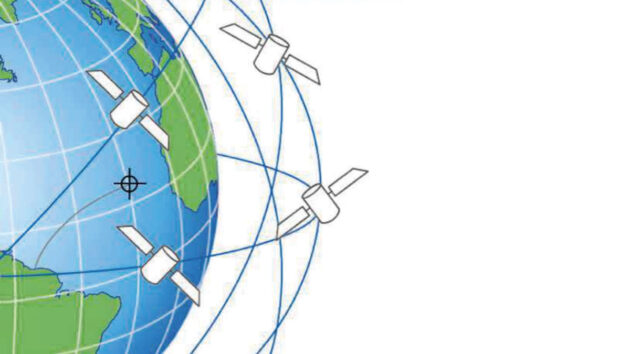
The GNSS system tracks the movement of the GNSS receiver over the Earth’s surface. Credit: RYA
Useful benefit
There is another very useful benefit of using vectors with a set time or length that addresses one of the weaknesses of many electronic charts; how to judge the scale of the chart.
Changing the vector length based on the type of navigation you are doing will help you recognise the scale of the area you are viewing on the screen.
For example, during pilotage you should have a smaller length, which enables us to have the end of the vector in view at all times, with the knowledge that the end of the vector is a set distance.
In the example above the vector is approximately 1.2 miles.
Once the vessel is in open water you should be extending the vector to a suitable length – perhaps up to 5 miles – to assist in keeping the chart at an appropriate scale.
Getting into the habit of identifying the length of the vector based on the scale of chart required will reduce the risk of missing hidden information because we are zoomed out too far, or we do not see the radar return or an Automatic Identification System (AIS) position of a ship in the distance as we are zoomed in too far.
If you haven’t made vectors a key element of your passage planning, try it out to see how much can be gleaned from such a simple feature.
AIS information
In the chart display (top of the page) we have an AIS target showing a vessel departing a harbour.
AIS gives us a head vector, which indicates their heading.
It is worth noting that this vector will only be reliable if the vessel in question has a heading sensor and water speed integrated with the AIS transmitter.
However, it is difficult to know whether they have it or not.
If they only have a GNSS connection, then they will use course over ground, which could be very different to the actual heading, making the aspect of the AIS targets incorrect.
As an extreme example, a vessel going astern could be presented as a vessel going forward as the assumption would be that the COG is the heading for a vessel going ahead.
About the author

Craig Burton is head of training operations at the Royal Yachting Association (RYA)
PBO’s new eNav in a Nutshell series is supported by Navimaps.co.uk – experts in marine cartography – Navionics & Garmin Navionics for chartplotters.

Nav in a nutshell: Know tidal vectors
'It’s easy for any sailor to remember how to draw tidal vectors with a handy little aide-mémoire!' Says Dick Everitt.…
Sailing ‘La Semaine’: how I faced hidden 8-knot currents and whirlpools on traditional craft
Your sailing education is not complete until you’ve sailed La Semaine, I’d been told by my sailing mentor. Calm seas,…
eNav in a Nutshell: Passage planning in the digital age
Using digital sources to answer basic navigational questions can take some of the hard work out of passage planning and…
What to read more features like Using vectors?
A subscription to Practical Boat Owner magazine costs around 40% less than the cover price.
Print and digital editions are available through Magazines Direct – where you can also find the latest deals.
PBO is packed with information to help you get the most from boat ownership – whether sail or power.
-
-
-
- Take your DIY skills to the next level with trusted advice on boat maintenance and repairs
- Impartial, in-depth gear reviews
- Practical cruising tips for making the most of your time afloat
-
-
Follow us on Facebook, Instagram, TikTok and X